
-
 Media gallery

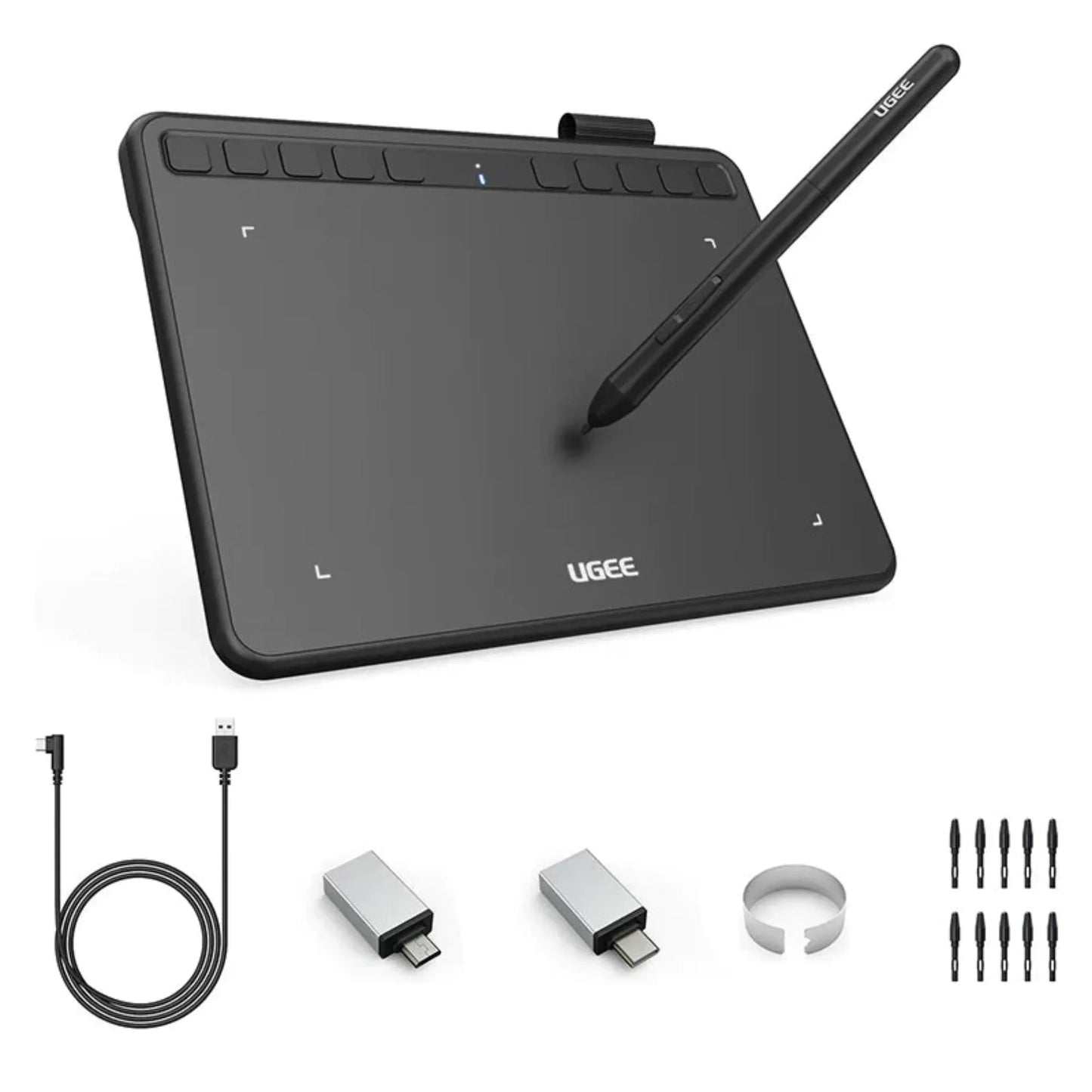
Ugee S640 6.5-inch Drawing Tablet
- Sale price
- Rs.11,299.00
- Regular price
-
Rs.15,500.00 - Regular price
- Rs.11,299.00
- Unit price
- per
Pay by bank transfer and save
4% + Rs. 249 offChoose Bank Deposit at checkout and enter both codes in the discount code box.
Guaranteed safe checkout
Couldn't load pickup availability
Ugee S640 Graphics Drawing Tablet — Affordable Precision for Every Artist
The Ugee S640 is a compact, highly responsive drawing tablet built for digital artists, students, designers, and online educators who want serious pen performance at an entry-level price. With 8192 levels of pressure sensitivity, a 60° tilt-supported battery-free stylus, and 10 customizable express keys, it delivers smooth, natural strokes that closely mimic real pen-and-paper drawing.
Compatible with Windows, macOS, Android, Chrome OS, and Linux, the S640 works whether you're plugged into a laptop or drawing directly on an Android phone. Its slim, lightweight body slides easily into any backpack, making it an ideal first tablet for beginners and a dependable everyday tool for creators, note-takers, and remote teachers.
Key Features of the Ugee S640
- 8192 Levels of Pressure Sensitivity — Capture every stroke with precision — from light, delicate lines to bold, thick strokes.
- 60° Tilt-Supported Battery-Free Stylus — The P01 pen never needs charging or batteries and supports 60 degrees of tilt, enabling natural shading and brush-angle control.
- 10 Customizable Express Keys — Program all 10 keys for zoom, undo, brush size, eraser, and more — and set different shortcuts for each application.
- 5080 LPI Resolution & Fast Report Rate — High resolution and a responsive report rate keep your lines smooth and lag-free, no matter how fast you draw.
- Wide Compatibility — Works with Windows 7/8/10/11, macOS 10.10+, Android 6.0+ (via included OTG adapter), Chrome OS 88+, and Linux — plus Photoshop, Illustrator, CorelDRAW, Clip Studio Paint, SAI, and Krita.
- Slim, Lightweight & Portable — Ultra-thin at just 12 mm and light enough to carry anywhere.
- Durable, Beginner-Friendly Design — A scratch-resistant surface, anti-slip back, and easy setup make it reliable and welcoming for first-time users.
Specifications
- Active Area: 6.3 x 4 inches (160 x 102 mm)
- Pen Pressure Levels: 8192
- Stylus: P01 battery-free electromagnetic pen (60° tilt)
- Resolution: 5080 LPI
- Report Rate: ≥220 RPS
- Express Keys: 10 customizable
- Connectivity: USB-C (L-shaped cable; USB-A + Micro USB OTG adapters included)
- Compatibility: Windows 7/8/10/11, macOS 10.10+, Android 6.0+, Chrome OS 88+, Linux
- Dimensions: 215 x 162 x 12 mm
- Weight: Approx. 0.37 kg
- In the Box: Tablet, P01 stylus, pen clip, 10 replacement nibs, USB-C cable, USB adapters, quick guide
- Colours: Carbon Black, Coral, Violet, Beige
Ugee S640 vs Wacom Intuos Small (CTL-4100)
- Pressure Levels: Ugee S640 8192; Wacom Intuos Small 4096
- Tilt Support: Ugee S640 Yes (60°); Wacom Intuos Small No
- Express Keys: Ugee S640 10; Wacom Intuos Small 4
- Active Area: Ugee S640 6.3 x 4 in; Wacom Intuos Small 6.0 x 3.7 in
- Android Support: Ugee S640 Yes (OTG); Wacom Intuos Small Yes
- Battery-Free Pen: Both Yes
Why Buy the Ugee S640 from Dynsol.pk?
- 100% Genuine Products — Only original Ugee units with authentic accessories and warranty assurance.
- Competitive Prices — Sharp, market-leading pricing on every order.
- Fast Nationwide Delivery — Quick, reliable shipping across Pakistan.
- Trusted Since 2016 — Nearly a decade of serving Pakistan's tech and creative community.
- Physical Store in Lahore — Visit us at LG 54, Hafeez Centre, Gulberg III to buy in person.
- Secure Checkout — Safe, protected payment on every transaction.
- Trusted Customer Support — Genuine guidance, troubleshooting, and after-sales help.
Frequently Asked Questions
Q: Does the Ugee S640 pen need charging?
A: No. The P01 stylus is battery-free and never needs charging or cords, so it's always ready to use.
Q: Can I use the S640 with my Android phone?
A: Yes. It supports Android 6.0 and above via OTG, and the required adapters are included in the box. It is not compatible with iPhone or iPad.
Q: How many shortcut keys does it have?
A: The S640 includes 10 fully customizable express keys, and they can be set differently for each application.
Q: Is the Ugee S640 good for beginners?
A: Yes. It's very beginner-friendly with an easy driver setup, while its 8192 pressure levels and tilt support are capable enough for professionals too.
Q: What software does it work with?
A: It works with all major creative software including Photoshop, Illustrator, CorelDRAW, Clip Studio Paint, SAI, and Krita, plus Zoom, Word, and PowerPoint for online teaching.
Notified by email when this product becomes available

Rs.11,299.00
You may also like
Customers also bought these trending products


